Handling long-running background tasks in Python traditionally meant reaching for Celery or Redis Queue (RQ). While adequate for simple "fire-and-forget" jobs like sending a welcome email, traditional task queues struggle with multi-step distributed workflows.
When a background job spans multiple stages—charging a payment, provisioning cloud infrastructure, generating PDF invoices, and notifying users—a worker process crash leaves your system in an unknown, orphaned state.
**Temporal.io** introduces **Durable Execution**: your code executes as if the underlying server never crashes, keeping complete state and variable history intact.
Why Traditional Background Tasks Break
Consider provisioning a customer tenant:
1. Charge credit card via Stripe 2. Provision PostgreSQL database 3. Register DNS subdomain 4. Send onboarding email
If the worker pod runs out of memory (OOM) or is restarted during step 3, Celery does not know which steps ran without custom state database tracking. Retrying from step 1 risks double-charging the customer!
How Temporal Guarantees Durability
With Temporal: - **Workflows** are deterministic orchestrators that define the execution sequence. - **Activities** are idempotent tasks that interact with non-deterministic external services (APIs, databases). - Temporal logs every activity completion in an append-only event history. If a worker server dies mid-workflow, another worker resumes execution from the exact point of interruption without re-executing completed activities.
```
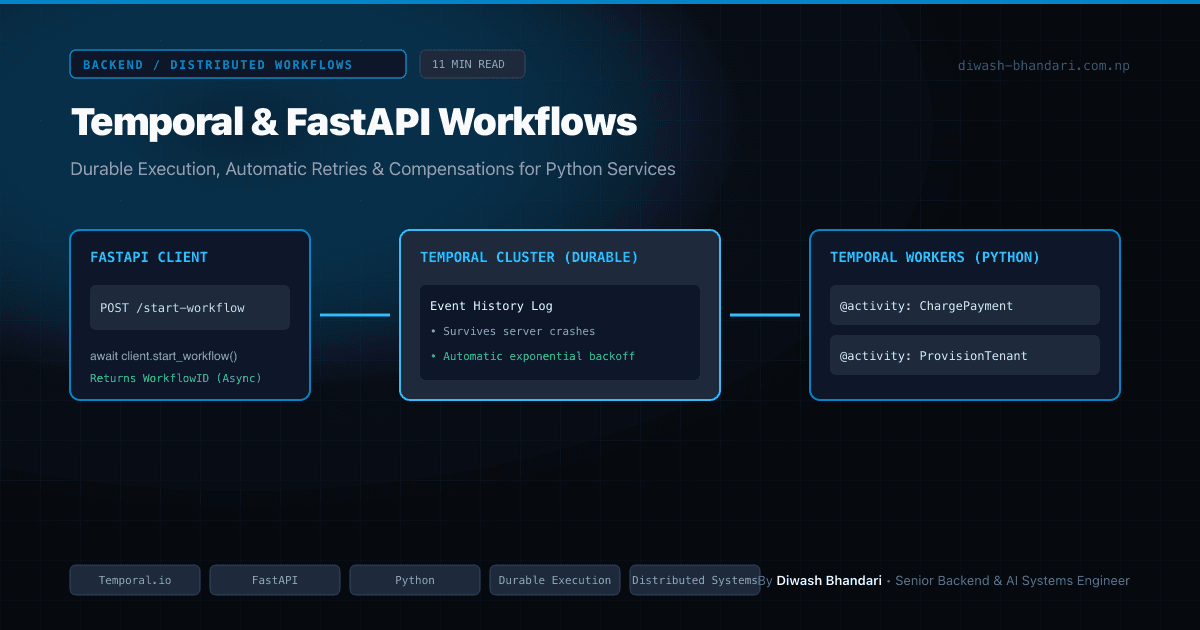
FastAPI Endpoint ──► Temporal Client ──► Temporal Cluster (Durable History)
                                                    │
                             ┌──────────────────────┴──────────────────────┐
                             ▼                                             ▼
                     Activity Worker 1                             Activity Worker 2
                   (Stripe Payment Charge)                       (Database Provisioning)
```
Step 1: Defining the Activities
```python
from temporalio import activity
import httpx
@activity.defn async def charge_customer(amount: int, customer_id: str) -> str: async with httpx.AsyncClient() as client: res = await client.post("https://api.stripe.com/v1/charges", ...) return res.json()["id"]
@activity.defn async def provision_tenant_db(tenant_name: str) -> str: # Run database migration scripts return f"db_{tenant_name}_prod" ```
Step 2: Defining the Durable Workflow
```python
from datetime import timedelta
from temporalio import workflow
from temporalio.common import RetryPolicy
@workflow.defn class CustomerOnboardingWorkflow: @workflow.run async def run(self, tenant_name: str, amount: int, customer_id: str) -> dict: retry_policy = RetryPolicy( initial_interval=timedelta(seconds=2), backoff_coefficient=2.0, maximum_interval=timedelta(minutes=1), maximum_attempts=5, )
Step 1: Charge charge_id = await workflow.execute_activity( charge_customer, args=[amount, customer_id], start_to_close_timeout=timedelta(seconds=30), retry_policy=retry_policy, )
Step 2: Provision db_name = await workflow.execute_activity( provision_tenant_db, args=[tenant_name], start_to_close_timeout=timedelta(minutes=5), retry_policy=retry_policy, )
return {"status": "SUCCESS", "charge_id": charge_id, "database": db_name} ```
Step 3: Triggering from FastAPI
```python
from fastapi import FastAPI, Depends
from temporalio.client import Client
app = FastAPI()
async def get_temporal_client() -> Client: return await Client.connect("localhost:7233")
@app.post("/onboard") async def onboard_customer( payload: OnboardRequest, temporal: Client = Depends(get_temporal_client) ): handle = await temporal.start_workflow( CustomerOnboardingWorkflow.run, args=[payload.tenant_name, payload.amount, payload.customer_id], id=f"onboard-{payload.tenant_name}", task_queue="onboarding-queue", ) return {"workflow_id": handle.id, "run_id": handle.result_run_id} ```
Key Takeaways
1. **Survives Infrastructure Failures**: Deployments, pod restarts, and network partitions do not lose progress. 2. **Built-in Sagas**: If step 2 fails permanently, catch the exception in your workflow and trigger refund activities automatically. 3. **Observability**: The Temporal Web UI provides step-by-step visual debugging with exact inputs, outputs, and stack traces.
Building mission-critical Python background pipelines? [Contact me](/contact).